Morse endecoder

About:
This is just a little writeup about a Morse code encoder and decoder I made for the Arduino platform. I spotted someone asking for one at the Arduino forum in november 2010, even offering a reward, but alas I was too late for that. No matter, for reasons unknown to me (I’m actually not that into Morse) this is one of many small projects I have been meaning to get around to, but lacking impetus I hadn’t yet done (as with many others). And besides, I would’nt really sell “my” morse decoder anyway. So I gave it away

Here is the project page on google code, with description of how to use it in your own programs: http://code.google.com/p/morse-endecoder/
What follows is basically just a little explanation as to how it works..
I even made a little youtube video testing an earlier version of it. I’m almost hesitant to post the link, as the editing leaves a thing or two to be desired… IE not my best video, but anyway, here it is:
Link: Morse endecoder video
.
A little prehistory (very skippable):
However the story begins a “little” earlier, end of 1991 actually, when I had an Amiga 600 and tried to learn a bit of 68000 assembler. I was into this kind of stuff even then, and had made an 8-bit sampler for the Amiga as per described in an issue of (I believe) Amiga Format. It was, typical of me and my never-really-finished projects, “built” into a shampoo tube(!). I have no picture of it atm, and the Amiga and sampler is long since sold. I never really made anything worth mentioning in 68000 assembler either, btw (a half-finished Master mind game comes to mind), nor in electronics really. I remember I managed to mirror the PCB tracks for the connector on that sampler, so I had a nice time correcting that, even bought another one of those ZN448E 8-bit sampler IC’s in the process, which I still have! (And remember the name of…I hope). And it wasn’t that cheap either.
But before I sold it, I did manage to make a backup of a pretty newly installed system on my then-amazing and first-ever harddrive of 20 MB! Yes, twenty megabytes! A mere little textfile nowadays. But a hole system then, and it contained quite a lot too (no movies or such, of course).
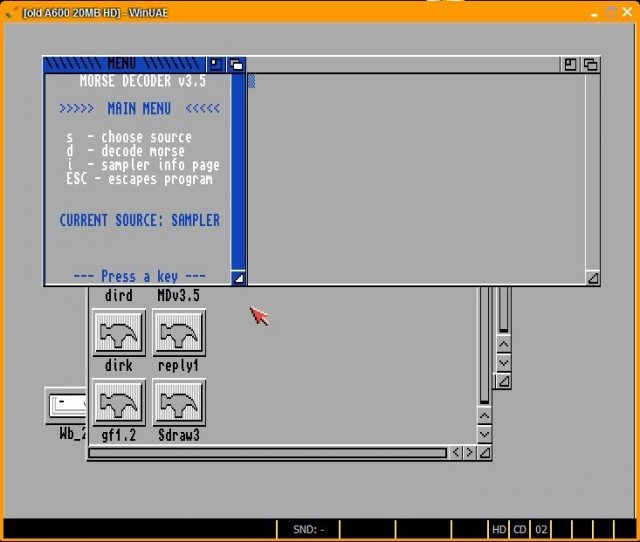
So I fired up the brilliant E-UAE amiga emulator for my Ubuntu box, and had a look at the source code. The program even worked (as it did before, I just never reallyactually used it, except get it to work). Of course I don’t have any sampler to test it with on the emulator.
A little screenshot, just for nostalgia:
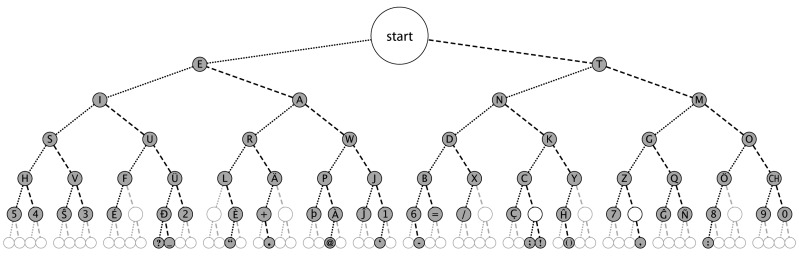
I just wanted a look at the source code, and even found my old paper notes about it (I save a lot of stuff). And I decided to use the same binary tree method I used here. In the process I also checked the wikipedia article on Morse code, and found the method had a fancy name:
A dichotomic search tree.
Except that it’s really a misnomer, as well as “binary tree”, because there there are really three possibilities at each node: Go left, go right, or stay. This method was the only thing I used from that code btw, its a complete rewrite for the Arduino. Also, my Arduino classes can encode in addition to decode Morse code.
.
Morse decoding method:
.
The method used is really simple. Morse code has only two signals, dots and dashes. Begin at the top of the Morse code tree:
(Picture from the Wikipedia article above – click to enlarge, then click “Large”)
- If you receive a dot, go left
- If you receive a dash, go right
If there is a pause, you got the letter! Thats it!
Well, almost. There are some different kind of pauses and some rules of Morse code to consider:
- A dash is three times the length of a dot
- A pause for a dot’s time is between different signals for the same letter
- A pause for a dash’s worth is between diffent letters in the same word
- A pause for 7 dots, or two dashes and a dot, is between words (a space character)
Only thing my encoder / decoder does not have those “non-english” characters, yet.
.
It just so happens that the above binary tree fits perfectly in a long one-dimensional string. The top (“START”) is then in the middle of the string, and the Morse table is stored simply like this:
char morseTable[] = “*5*H*4*S***V*3*I***F***U?*_**2*E***L\”**R*+.****A***P@**W***J’1* *
6-B*=*D*/*X***N***C;*!K*()Y***T*7*Z**,G***Q***M:8*!***O*9***0*”;
A string of 127 characters (128 with NULL byte). Except I had to split it somewhere in the middle (not shown) to avoid the */ (or /*, I can never remember) comment block since the compiler complained about it (thanks to “coding badly”s brilliant suggestion at the Arduino forum. His name is a misnomer too btw)
For the top (middle) of the morse tree I used a “space” character, somewhat convenient since the same string is also used for decoding. There are also a lot of asterisks denoting invalid Morse codes.
Two variables I used in my code for the Morse table is:
- MorseTablePointer
- MorseTableJumper
Consider this image when starting to receive a new character:
(Click to enlarge, then click “Large”)
Somewhat inaccurate, it wasn’t easy hitting the letters right on with the circles. Anyway, MorseTableJumper denotes the “jump distance” to the left or right.
At each level down the tree (for each signal received), the MorseTableJumper value halves. When it reaches a value of 1, it is at the bottom. If it becomes 0 (zero), there are too many Morse signals in one Morse code “letter”, and an error character indicates this. The error character I used is the hash symbol “#”. It’s also possible to reach an invalid position while still inside the Morse table, which is denoted by the asterisk character “*”.
.
Example:
Lets say you receive the character “U“, which is dot – dot – dash (or “di-di-dah” in Morse speak I think).
Then the MorsetablePointer and MorseTableJumper variables in the program gets updated as such, for each received and decoded signal:
(Click to enlarge, then click “Large”)
Then for the next character they are reset to initial values again.
.
Timing and Morse speed:
.
According to Wikipedia, the time for a dot in milliseconds is calculated as:
- Dot = 1200 / wpm
Where wpm is words per minute, and is some word they made up of some standard length. 13 wpm is one standard speed, 8 is another. But there are also other standard speeds. I’m just not sure what they are.
.
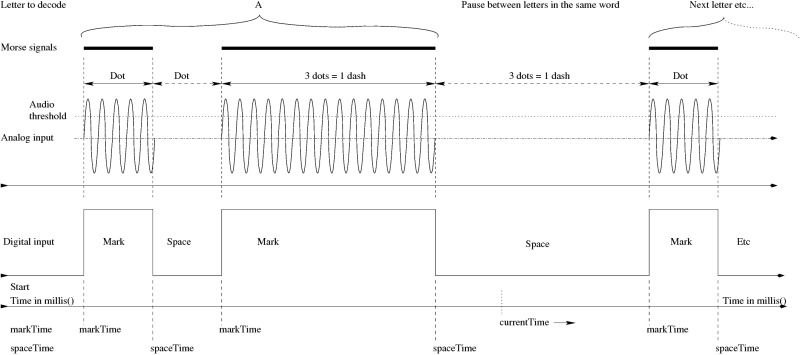
I always find a drawing, even a little one, helps when coding something. Below are a somewhat more elaborate one than the one I made at the time, also showing an analog input, and a digital one, with an arbitrary example signal, and the three most important variables used to determine what kind of signal it is:
- markTime
- spaceTime
- currentTime
They all update continously, depending on the input. For audio (analog) Morse signals there is also the audioThreshold variable, used as a simple signal filter. Analog input should vary around the center value of 512-ish, audio threshold is initially set to 700, which worked well for me in my test setup.
(Click to enlarge, then click “Large”)
The Morse signals (dots and dashes) are decoded during the pause (Space) in the Morse code. I used a generous tolerance for both pauses and signals to ease my own bad keying:
- If the pause is longer than 1/2 dots time, the pause is valid and the previous signal is determined:
- If the previous signal is longer than 1/4th dot, the signal is deemed valid.
- If the previous signal also is less than 1/2 dash time, I say it is a dot.
- Else if instead the previous signal is longer than1/2 a dash but shorter than a dash + 1 dot, I say it is a dash.
And I think that is enough said about that. It’s all in the source code.
.
Morse encoding method:
As mentioned, the same binary tree (Morse table string)is used for encoding. Thanks to my scanner not wanting to scan for the lack of… ink of all things, I cannot scan my little drawing for that (which is another little project-to-be, maybe… thank you Canon MP 610, nice printer, bad printer! Now I get what “All-in-one” really means :/ )
Sorry for the rant, I got a nice camera though, here’s my crude drawing:
Suffice to say I found an algorithm for it, and you can look it up in the code if you are so inclined. In short, it involves scanning for the character one wants to encode. Once found in the morse table string:
Let position = the string position + 1 to make it 1-basedFirst find what “level” in the morse table it is (bottom level = level 1). To find the level:
for(inti = 0; i<= morseTreeLevels; i++)
{
if(((position + 2^i) / 2^(i+1) == integer)
{// then
startLevel = i;
break;// skip rest of for loop
}
}That is to say, there are no remainders of that operation.
Then, one needs to build the Morse signal, backwards from the position to the top of the tree, using almost the same algorithm:
FOR i = startLevel to morseTreeLevels
{
add = 2^i
IF ((position + add) / 2^(i+1) == integer, then
{
// it will be a dash, and we need to go
// back up to the left in the table
position = position - add;
} ELSE {
// It will be a dot, and we need to go
// back up to the right in the table
position = position + add;
}
}And thats the principle of that, basically. This output signal string is just a temporary holder for the Morse signals when toggling the output pin in Morse code, just ASCII dots and dashes.
.
Schematics:
The schematics is really simple. I played with Fritzing when making this, and that is pretty quirky when it comes to making schematics.. however it did have an Arduino premade there, and with some tweaking it is sort of OK-ish.
(Click to enlarge)
Ok, that’s it for the Morse encoder / decoder thingy, for now at least. There are still a few things to do with the decoder and encoder classes, making the Morse table in PROGMEM is one of them, but for now this is it.
-raron
====================Hey i was wonder what the morse keyer button is. And if i am doing a porject that tranalates text to morse and then projects the morse via laser and then the photoresistor to arduino, does the decoder work?
thanks====================Hi!
The morse keyer button can be anything. The thing is that it is a digital signal, connected to a digital input. So you got to handle the signal shaping in hardware, to give a clear digital signal for the Arduino to read (like a schmitt-trigger, for example). Or, you could pretend it is an audio signal, and hence use an analog input if that is simpler. Then you could also set the “.AudioThresholdvalue” in software.Provided you do not send signals faster than the photoresistor can react, it should work. Photoresistors, or LDR’s, are pretty slow. For normal-ish morse speeds (not in the 100s WPM) I think it should work. I don’t really know what the “speed limit” (frequency response) is with a LDR. If you want a faster speed, you might want to consider another sensor (maybe even use a LED as a sensor, use same color LED as your laser).
====================THANK YOU RARON!!!!
For a school project I had an idea for a Morse-Code-To-Twitter machine, and I couldn’t have been able to do it without your AMAZING Morse Encoder / DeCoder Library.
My only challenge was figuring out how to collect the “chars” into strings, reading in processing, displaying messages and then sending to twitter. Thanks to all the time you saved me I had time left to modify yours to create extra buttons on the board for a “backspace” and handy “send to twitter” button right on my circuit board. Once I finish everything and clean up the code I’ll make it available so other people can join the #sentWithMorse twitter stream thanks to YOU!!!you can see it operational here:
THANK YOU SO MUCH
====================Hey, very cool! I look forward to take a peek at your arduino + processing code. In fact I have still not really made anything like that (communicating with software on a computer, well other than the Arduino serial monitor) yet.
Also thanks for the comment! Nice to know the library works for you.
====================Morse-Bot now has preemptive smartassery coded in. No bad words shall pass through Morse-Bot. Also, some easter eggs. http://bit.ly/gNXHST
====================hey Raron, can you please send me your email so I can send you teh code? It’s not done but I’m happy to send it. my email address is provided in the Leave a Comment “required fields” and shoudl show up in the backend of WP
====================Hello raron,
I was considering building two of these and using them to communicate textual data between two computers just for kicks. I wanted to basically remake a dial-up style line. How complicated is it to actually build one of these on a bread board, and what type of Arduino did you use? I am not very skilled, and was wondering if I should attempt it. Thanks!====================Hi there!
So you basically want to do what I did in my video, except with wires instead. My reception at 400 wpm failed, but I also used audible sounds that I guess interfered with each other somewhat. Which I did just for kicks too btw
Of course you also need some software to send/receive from the Arduino’s, I just used the serial monitor in the Arduino IDE. But if you want to make a more custom solution, I think processing or Python should be great.
In short, it shouldn’t be any problem, BUT with the possible complication if the computers are far away. Then you get issues with regard to Morse speed, noise and reflection (more noise) if not terminated correctly. Then you might consider some RS232-like line converters at each end, for example. The signals are pretty slow even at 400 wpm, so I guess reflection will not be an issue (noise and line capacitance might though). I haven’t really done this so I can’t say for sure. With a really long line you should read up on line characteristic impedance and how to terminate it.
Disregarding a line length / signal noise complication, it should be really easy. Simplest case would be to use three wires – one for a common GND reference, two for the morse signals back and forth – morse output #1 to morse input #2, and morse output #2 to morse input #1 (#1 and #2 referring to the different Arduinos).
To be on the safe side you should at least use supply clamping diodes, especially with “some length” (say more than a few meters?) for the wires. See http://www.thebox.myzen.co.uk/Tutorial/Protection.html
Also I would recommend a small-ish resistor in series with the input, as in the link above.I used an Atmega 328-based Arduino clone (The “BBB” from Modern Device), but any Arduino should work basically. Your “wired Morse dial-up” should be just as easy, or easier to build on a breadboard than my verision.
====================Hi,
there are compilation errors with Arduino 1.00:
MorseEnDecoder.h:16: error: ‘boolean’ has not been declaredsee http://nootropicdesign.com/forum/viewtopic.php?t=2434
I changed
#include “WProgram.h”
to:#if defined(ARDUINO) && ARDUINO >= 100
#include “Arduino.h”
#else
#include “WProgram.h”
#endifNow it compiles without errors
Greetings
====================Hi
Thanks for commenting and telling me about this. I haven’t tried the 1.00 version of the Arduino IDE yet, so I’m a bit out of touch atm. I’ll implement your changes soon when I can.
Thanks again!
-raron